Showing posts with label kanban boards. Show all posts

October 13, 2012

How to study for your next exam with Kanban

The best way to plan and execute a project is of course, using Agile. But planning an Agile project, even around the house, is not just about Kanban, it's also about adopting the right way of continuous planning. The GTD (Getting Things Done) approach, and being able to follow through, make conclusions and make changes, based on real life changes.

Let's take studying for exams as an excellent example. 
I still remember the pressure as a student, when you have to prep for several exams together, each one covering a whole semester. I had tons of material to cover – and of course, I was also waiting tables at the time.
It's not easy to study, work, schedule around the exam dates and cover all the material, when you sometimes have to cope with seven exams in a month. In fact, it requires a plan.
As luck would have it, we have this post about Agile to help us plan this out J

1. Create your backlog:

Use continuous planning methods –drill down to the level of detail you need at the righ moment.

” Lets think of the planning process as continuously decomposing a product vision while focusing on those features of greater priority (value) to the business. This decomposition uses just-in-time methods to prevent wasted effort on lower-priority or unneeded features. That is, we expand on features just as much as we need to according to our expectations of when we will build them (this order is determined by the value they provide to the customer).
This plan enables the team to look ahead responsibly so that large-effort activities can be broken down in small enough segments (right-sized work) and balanced against higher priority items that come up. A good release plan provides a clear visual control and obviates the need to look too far ahead and work too far in advance on future, larger features."

For starters, to cover the studying period, list the courses that you'll be taking exams on. Don’t go into detail yet – look at the first column in the chart below. 


Visualize your courses with different colors.

Visualize your exams timeline.
Order your exams according to their set date. 


Tip: Estimate the effort it will take you to study for the exam using our simple sizing technique.
This action will allow you to visualize your ability to complete those building blocks.


Now that you have your overview, start drilling down into each subject, adding elaboration where needed. Do just what you need, no more. 
(For example, if you were planning a wedding, you'd write down high level tasks (where, when, dress, guest list). You don't start writing down who sites where (or at least, not until you are much closer to the wedding day).)
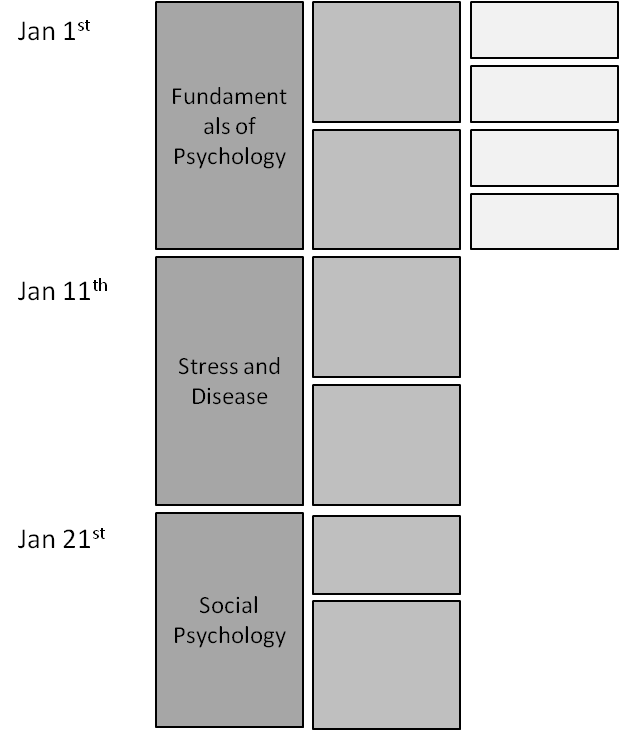


·         Each course exam is broken down into reasonable study units
·         Some units are broken down further, if required.
·         You don’t have to go into minute detail on all the units – just those you need to at the time. For example, if “Fundamentals of Psychology“ is coming up, I'll break it down into smaller parts, and when I really start studying, I will break it down to even smaller tasks.

Priority level of details settings:  
When you drill down into each exam, decide how detailed you want it to be. Do you really need the details of every sub-subject?


Ready To Go:
These items are what you need to start working on right away, and so have the maximum detail necessary. They have a clear definition of 'done' (For example: pages 1-20 + answer questions 23-56)

Don't add too much detail!
Don't add detail for every task, for every subject, for every exam, right away. When the date approaches – then you can start fleshing things out with more detail.


Work with small items, meaning make sure ready items are in a level of details that is reasonable to achieve. ‘(a day size item may be enough).

Use sticky notes as a good visualization of what we need to study. It also makes sure that you can quickly change, add and adapt to change. (Agile, remember?)

2. In progress: what we actual studying.
·         Pick up items according to priority.
 Learn one topic at a time and move it along the board.
 Work on one item at a time.


3. Done
Follow the Definition Of Done. It’s not done till it’s done.


© Example taken from myagile.co.il.
And don’t forget to have fun while doing it J


June 09, 2012

A mother creative solution for helping her girls with their homework

Agile@Home :

“ I do believe in Kanban, it did help my daughter in school big time!

2 years ago, she used to bring her homework, put her agenda on her desk and start crying :) she didn’t know where and how to start. At school, they give them lot of tasks to perform every Thursday. They write them in their agenda, and they have to perform all of them by the next Friday (they have one week).
Schools and teachers expects kids to manage their tasks by their own, but in reality,  I see all parents around me managing the homework tasks for their kids. Some parents and kids are great working with the traditional agenda, but for my daughter, it was a big a challenge.  One day she forgets her agenda at school, the other day she starts multiple tasks same day, another time she forgets that she didn’t finish a task etc.

The agenda was not working for her, I tried to help her with it, but couldn’t, it was simply not for her! I had to find  another way, a better way. I wanted a solution that will help her structure her homework tasks by her own, without me asking, did you start your task, did you finish it, how many tasks left etc…
Both my husband and I are software engineers, my husband is a scrum master, he knew about agile mythologies and Kanban. My husband suggested to use Kanban as an alternative for her task management, because he knew that she was very visual, and Kanban will be perfect for her.  I loved the idea; we started using Kanban as a physical board with stickers.

 It was great for the last 2 years, until my other daughter needed the same thing. They didn’t want to share the physical board J  Instead of having 2 separate boards (eventually I will have 3 because I have a son who is in Grade 1 and will certainly use Kanban as well), I wanted to build something reusable, fun, easy and made specifically for young kids, so as an agile developer, decided to make a fun app for my kids. Android was the first step because tablets are less expensive and we could have one tablet for each of our 3 kids :) 
 
I started developing the app , kids enjoyed the experience, because they participated, they asked for features (task becomes red when it is due next day,  earn points when they finish a task etc…), they have chosen colors, pictures etc… They have been using it since March 2012, and they just love it! Even my 6 years old son is using it for his homework which I didn’t expect, thought he was too young. I realized that kids nowadays are born in a modern era, with Ipads, tablets, smartphones etc. They naturally love using devices, so why don’t get even my son a tablet for his homework and teach him managing as well!  He loves earning points and practicing maths on   KanPlan .

It’s not just the tablet and the board, it’s the way they own their task that makes this whole deal worth a try. The Kanban is a minded approach, it teaches them visualize what they need to do , moving tasks around the board , making decision  and getting things done.


The app, was designed for them, it had to be easy and fun. It holds a neat look and feel and an easy way for the kids to add tasks drag them around the board and see the completion. I also added predefined tasks, that are quick to add and run on   KanPlan . Something like practicing times table. Instead of my daughter entering manually a task for practicing her times table, she browses a selection of tasks (KanQuiz), picks the one she wants, and running it directly in KanPlan. It avoids me of writing some multiplications on paper to practice. It is integrated, and gives her a report at the end how fast she was and her score.  I see KanQuiz as reusable tasks, that can be done several times by one kid, and are there for my next kid once they reach the KanQuiz grade level.   I am also adding KanWord to the selection (tablet will speek to kids), to practice spelling and grammar soon. 

Anyway, my kids are 100% self-managed now, I am so proud of them, they come at home after school, they go directly to their desk where their tablets are, and enter their tasks and manage their work. My daughter went from being an average student who was unable to focus, was lost in her tasks to do, to an efficient and  very organized student, now she always finishes a task before starting a new one and never forget a task to do. She was able to manage her tasks to practice exams for entering  private schools. She did that using   KanPlan by her own.  She applied for 4 private schools, we were hoping to get 1, and she succeeded all of them! We were so proud of her!


My daughters wish to bring their tablet  at school and avoid the “agenda” step. Instead of writing their tasks in the agenda and enter them back again in KanPlan once at home, why not entering them directly to KanPlan in the class?  Schools are too strict right now, they don’t want electronics in their classes. I am positive that it will change one day.  I just hope that they will allow students to use different solutions for their task management, because the traditional agenda is not a solution that fits all students.  I definitely see KanPlan as a solution for teachers/tutors who want to teach kids how to manage their tasks.  I have few comments from some teachers who are waiting for the admin tool (we are working on it) that allows them to create KanTasks and assign them to their students. Students will automatically see their tasks in the TODO list!  I would love to talk to more teachers/tutors to get more comments about how we can use KanPlan in a class environment that fits and embrace how teachers/tutors work.


My challenge now is to continue improving   KanPlan and keep it interesting and fun for all kids. Don’t hesitate to contact me for any comment, any feature request or change request !

Houda Hamdane the owner and developer of  KanPlan .

April 29, 2012

Mind mapping and your to-do list:


Here we are again, presenting another fun and creative way to arrange our tasks to help us get things done.

Today, I want to introduce to you - The Mind Map.

Googling 'mind map' shows you dozens of images and techniques of mind mapping.


I’ve even published an article about mind mapping the software testing exploratory technique myself.

Mind mapping is one of the most powerful visualization tools for ideas, flows, goals - whatever we want to achieve. It works wonders with kids, as they visualize their way through the things they want to do.

Why use it at home?

Because it is another way that helps us get things done. Because it works for so many people. Because It is so simple and effective, that I just had to talk about it.

As usual, I want to keep things simple. I prefer to use mind mapping as an initial tool to initiate our wish list, to get our to-do list in order.

But first, what exactly is mind mapping?

"A mind map is a diagram used to represent words, ideas, tasks, or other items linked to and arranged around a central key word or idea… Mind maps have many applications in personal, family, educational, and business situations, including notetaking, brainstorming (wherein ideas are inserted into the map radically around the center node, without the implicit prioritization that comes from hierarchy or sequential arrangements, and wherein grouping and organizing is reserved for later stages), summarizing, as a mnemonic technique, or to sort out a complicated idea. Mind maps are also promoted as a way to collaborate in color pen creativity sessions.

Mind maps can be used for:
     problem solving
     outline/framework design
     structure/relationship representations
     anonymous collaboration
     marriage of words and visuals
     individual expression of creativity
     condensing material into a concise and memorable format
     team building or synergy creating activity
     enhancing work morale”

Kids are doing it all over the world any way. So how do we do it?

Lets say we have this three week vacation coming up, and we want to plan what we want to do. As a regular reader of my blog you already know, that the best thing to do is build a mind map as a family, together. Visualize it, talk it over, and have fun with it!

1. So the first step of mind mapping will be to visualize a central word, topic, idea, subject, or concept.

Say - Holidays family activities.


2. Now, we add three or four ideas that are linked to the main idea.

Think , for example , what would we like to do in that period of time ?:

‘Have fun’
‘Do homework’
‘Paint the house’

Write those down on the board, or add sticky notes.


3. Now continue to add even more ideas under those ideas. Use bright colors! Arrows! Colored lines! Anything that makes the mind map easy and fun to follow.


4. Now, can we actually do everything we set down in the mind map? Well, luckily, you used sticky notes. Move them around, see what’s really important, and add them to a board. Call this your ‘To do’ column.


5. Now add two more columns - ‘In progress’ and ‘Done’.


See?

Mind maps are used all over, for all sorts of things. Education, life skills, chores, and so on. For us, it's just another fun way to help us get things done.


Citations:
     http://www.thinkbuzan.com/uk - official website of Tony Buzan
     Mind map pattern from : Tony Buzan © 2004 "Mind Maps for Kids : Rev up for Revision"

April 22, 2012

Easily estimating our home made Kanban tasks


A lot has already been written about Agile project estimation, and people practice task size estimation to varying degrees, as knowing how long your tasks will take helps achieve a better control and understanding towards the project’s delivery. Kanban is a bit deferent in terms of estimation since the items suppose to be close to being in the same size. Estimation in this sense is having our items closer to the size we can achieve them.  There are many techniques that you can apply, and of course, arguments as to why each one is obviously the best.

I think that sometimes we can agree that we cannot avoid estimating/sizing  our features and our tasks for a software project that has a budget, time line and content. We all know that estimation is a complicated thing to do, and that we learn how to get better at it by making lots of mistakes along the way. We also know that our estimates are probably wrong most of the time (at least at the beginning) and the best way to deal with it is to develop a continues improvement thinking of how to improve our time estimations, and of course, how to manage the inevitable delays. but we do know that when working on a 'small' size tasks is a good start for achiving them and the entire project delivery.

So how, you ask, do you balance task estimation with the limitations when using Agile and Kanban for ourselves and inside our family?
The answer is, of course, “it depends”.
Using Agile and Kanban at home is a bit different when it comes to estimating tasks. After all, can we expect our kids to estimate the time it takes them to tidy their room or to have their homework done? And should we even ask them to? but we can work on an achivable size of tasks.
In cases when we have set budgets and time-lines, it’s probably best to try to estimate our tasks as best as possible. Grading exams, or working on a university seminar are good examples. I’d even toss in a burn-down chart, but that’s a different discussion. Appointments and meetings could also be a good project to estimate your tasks for - A meeting takes 45 minutes, and I make sure I have a 15 minute break between meetings. So I can have five or six meetings a day, and still make sure that I have a break.

But  do we need this level of estimation for kids and family chores?
No. You don’t. There are other ways to get things done and still be able to size them to fit our needs. In my opinion Estimation is not so needed in Kanban since the items suppose to be closed to being in the same size. Estimation in this sense is having our items closer to the size we can achieve them. Its all about identify this ‘size’.

Here is a nice technique, often used in verity of software projects,  that will help you size your tasks so that you’ll be able to achieve more.

1.       Create your backlog and visualize it.

Visualize whatever you need to do. Once all the tasks are on the board, tasks become easy to manage and size. It also becomes easier to understand the size of the tasks one against the other.

2.       Use three types for a rough estimation.
Small
Medium
Big

** Very big - optional

The ‘sizing estimation’ in this step acts as  a big container allowing us to identify and separate tasks into different chunks.
you can create a column for each size, or give each size a different-colored sticky.
Now, ask your child to size his tasks according to what he thinks and place the in the Right column on the board.


3.       Listen and learn.
Remember when you where a child, places look bigger to you then they look today? That’s how your kids see their tasks. A lot bigger than they do to us. So listen and ask questions to make sure you understand the size of the task as it appears to your children:
What is a small task?
What is a big task? What makes it big?

Compare tasks to understand how the child sees the terms of 'big' and 'small'.

4.       Once  you have all the important tasks, divide big tasks into smaller ones.

Following an example of a big task the better be split to smaller ones:


5.       Stick to the small-medium tasks and prioritize your tasks.
6.       Pick one or two tasks, and off we go.


7.       Not everything at home needs to be estimated. In fact almost everything does not.

For example: let's say we have 2 days to complete learning to a math exam. Then the estimation may be a rough one: what is supposed to be done in the first day and what is our child expected to finish in the second day. We can then discuss each task and try to understand if it's in the first or second day. We can then use rough estimations for tasks that we think will need it.

So try to keep things simple . 

Rough estimation may be "just enough" at home with our kids: whenever we have a big task to do , let's examine our needs, divide it to smaller tasks to the size of 'just enough'.

Remember, we are dealing with kids not hi-tech employees. Visualization works for them much more. The same goes for colors, and playing games, and the fact that we parents are involved makes it even better. They love being with us, and they love it when we listen to them.
So, while this simple technique will help them learn how to estimate task sizes, and stick to what is really important to do without the burden of time pressure.

And as always , keep it simple , and don't forget to have fun along the way.


April 17, 2012

South America here we come…


We have agile kids concept in Spanish now.  


Una forma práctica de conseguir que se realicen las tareas diarias y de fortalecer la comunicación familiar. Niños ágiles es el manual que toda familia moderna necesita, en la que los padres tienen trabajos a jornada completa y en la que los niños siguen necesitando su atención.
Una parte esencial del desarrollo de vuestros hijos es su habilidad para elegir, ser independientes y controlar su vida. Y los padres tenemos que potenciar esa independencia.
Niños ágiles os enseñará cómo capacitar a vuestros hijos sin perder vuestra autoridad parental, mediante una serie de acciones prácticas. Cada capítulo puede leerse de forma independiente y os ofrece consejos que podréis llevar a la práctica enseguida. Los métodos descritos en el libro son efectivos en la enseñanza de valores y de respeto a los otros y aplica tanto a niños que van al colegio como a los que se forman en casa.
Así que ¡a disfrutar!

April 15, 2012

Homemade Kanban - How to make it last?

Agile@Home :


After understanding Agile and Scrum, the first question that parents ask is, "will it last?"
Have you ever asked yourself that?
I asked myself the exact same thing when I first started this. Then I started to think about, why did it last, and what were those things that didn’t last. What did we gain out of this?
But first things first. As a parent how do we make things last with kids?

I say, if you want it to last, make it last, just know when to let go. It's not really different from any other educational or behavioral skill I want my child to gain.
Let's say, you want your child to go to school every day. You will make sure it happens. You believe it is important, or you appreciate the value, or it’s the law.
So now we apply this to the task board. You’ve already found this method interesting, and you know the value, and you are already thinking about implementing it.
Then it will last longer.

So first - Believe in the expected outcome. Children can feel when you believe in something (and when you don’t). Make sure both parents agree about it, as it will last longer.
I personally believe that like everything that’s 'fun' or more like a "game" lasts more with kids than something that’s perceived as ‘boring’. Kanban at home can be lots of fun for kids, as it has colors, boards, notes, ideas, dialog, empowerment ……… and a lot of attention!
Speaking of attention. Remember, we emphasize the family dialog above every thing else. The great value besides 'getting things done' is a family dialog. This dialog should last above all.

What happens is that once the task board and tasks are routine, many recurring annoying tasks are not an issue any more, as we manage and control them as part of the family routine. Once out of our way, we have time to deal with the really important stuff.
The task board is then filled up with more important stuff that the kids and the family want to share and accomplish. Issues at school, fun days, exams, family projects and more.


So sometimes you may find that you aren’t using a task board any more, but you ARE having a healthy daily dialog between the kids and the parents. And things are getting done around the house and for your kids. They achieve these values using wonderful Kanban tools - visibility, the ceremonies (daily, retrospective, planning), and so on.
Whenever we think that we need the Kanban board again, we just start using it again. There are many things we can apply the same method to. Cooking together; birthday party preparation; learning to an exam; cleaning the house tougher or planning a trip; TV schedule; whatever.

So I think it lasts as long as we see the value. And it's perfectly OK to stop and say that we don’t need it anymore, and if we have a specific need, start up a board again.
Applying Agile tools is, for example, having a daily meeting, visualizing your tasks, getting things done, looking ahead and planning, looking backward to see if you can do it better next time and learn. Communication is key.
The task board is just the means to make sure those things last.

After all, succeeding with Agile has a lot to do with mindset.


April 08, 2012

The Power of Sticky Notes

Agile@Home :

These small squares that we stick on a board or on a wall, have power.

When we are trying to manage our time, and deal with the fact that we need to get things done.

Or when a group is talking about a subject they have more than three things to say about.

You can find these sticky notes all over your house, your office, even your computer, but do we acknowledge their real power?

Long before I was introduced to Agile and Kanban, I used to write everything down on notes, especially small square ones. One day, when I was still in my quality management role, I was introduced to the sticky ones.

Small, colorful, stick-to-anything notes.

I was hooked.

For someone with “ADHD” like me, these sticky notes were incredibly useful for figuring out where I put what and how to remember everything I need to do.

Pen and paper have always been the fastest way for me to express ideas, much faster
than any computer software, and of course, "The opposite of forgetting is writing down”. Combining this with a pack of sticky notes brought order to my day to day schedule.

Of course, it wasn’t that before my day was chaos. I managed my day and my tasks without sticky notes, but there’s no question that they helped make it much easier for me, and freed up valuable time for other tasks.

So what makes the sticky notes so powerful?

The first thing comes to my mind when thinking about the power of sticky notes is visibility.

Visibly is not just about writing it down. Visual thinking is already well known to be a powerful tool. So with sticky notes, I can write things down, put them where I can see them, and see my entire wish list, or the list of things I need to do or realize.

This is the first step in organizing my day to day activities.

With sticky notes, it's easy.


Now, when I have everything visual in front of me, I can start making choices.


I can start decide what I want to do and when. I can start moving those sticky notes around and checking myself before deciding on the 'path' I wish to take. I can even free some space to add more few things into my wish list.

My ideas are right in front of my eyes, so why not play with them? Add some colors, change their order around, add notes, group or sort them. This helps get some sense of them, and it is a pretty easy way of making choices.

It’s also a simple way of sharing my ideas with other people. When you put your ideas on sticky notes as a group, it’s an excellent brainstorm visibility tool, as well!

This is an amazingly simple way to help get things done.

So we visualize the things we want to do , and play around with them a bit. Now, we just need to do them, right?

So the last step you can do now is place those stick notes on a simple three column board, and visualize your way through having those ideas become a reality.


Sound familiar?

Since you can now see your ideas and how the tasks are moving forwards with your sticky notes, you can add, change and get early feedback over your own progress, maybe even change your ideas to adapt to your needs.


With kids at home, there is a lot of fun using sticky notes to get things done, and it’s pretty much the same way. It's just that the content of the sticky notes is different.

You can manage almost any chore with sticky notes. Simple day to day activities, chores around the house, your children’s schedule, your family trip, personal tasks, and huge software projects.


The funny thing I have noticed, over the last few years, that even task management software looks more and more like a board with lots of sticky notes.

See?! It sticks!

Ho… and don’t forget to have fun on the way…